
DPF Removal
Retires the soot model, regeneration logic, pressure monitoring and related codes for a filter that is no longer in play. Also searched as DPF off / DPF delete.
Upload the original File in the FILHEX Windows app, select the Solutions the job needs and download the result File. Every Solution on a File for 1 Credit; 5 free Credits after email verification.
Field-tested Files · No card needed to start · No subscription · Windows 10 / 11
On your phone, or prefer to sign up first? Create your Workspace online
Search the FILHEX catalog before you install — by Brand, ECU, or Solution.
Published catalog snapshot. Exact applicability is confirmed when you upload and scan a File in the app.
FILHEX is an ECU file service. A tuner or workshop reads a control unit with their own tool, uploads the original File in the FILHEX Windows app, and scans it. Scan identifies the Brand and the ECU from the binary and lists the Solutions that apply to that exact software — DPF Removal, EGR Removal, AdBlue / SCR Removal, Stage 1 and Stage 2, DTC clear, TCU calibrations and more. The technician selects what the job needs, FILHEX runs the Solution Job and delivers the result File, and the workshop flashes it with its own tools. Every Solution in the catalog is prepared and maintained by our engineering team; the job itself runs automatically. One processed File is one Credit, whatever is on it.
FILHEX is not a map editor, a seat licence, a flash tool or a workshop management system. There is nothing to renew and nothing to learn beyond reading and writing an ECU correctly. It is the File step of a tuning job, priced per job, on the PC next to your bench. Service model in detail: tuning file service · what a File actually is: ECU tuning files.
Three steps in the Windows app. You keep your read/write tools; FILHEX delivers the result File.
 Upload and scan
Upload the original File. Scan shows the Brand, ECU, and the Solutions that apply — no Credit spent.
Upload and scan
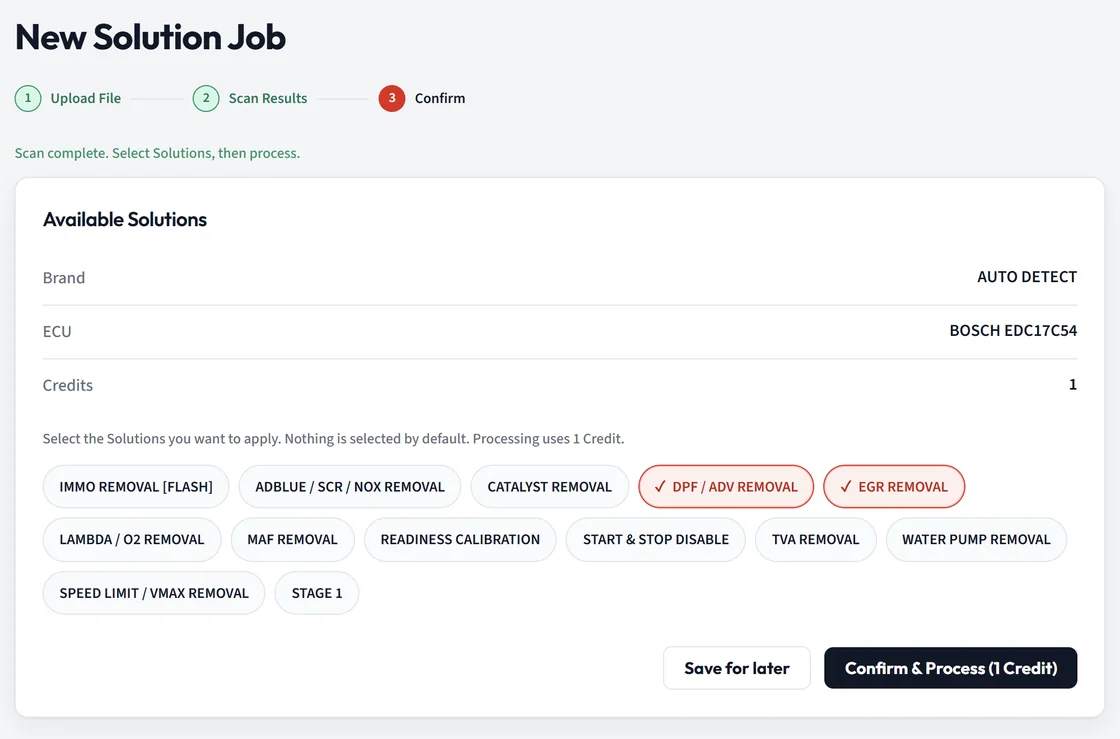
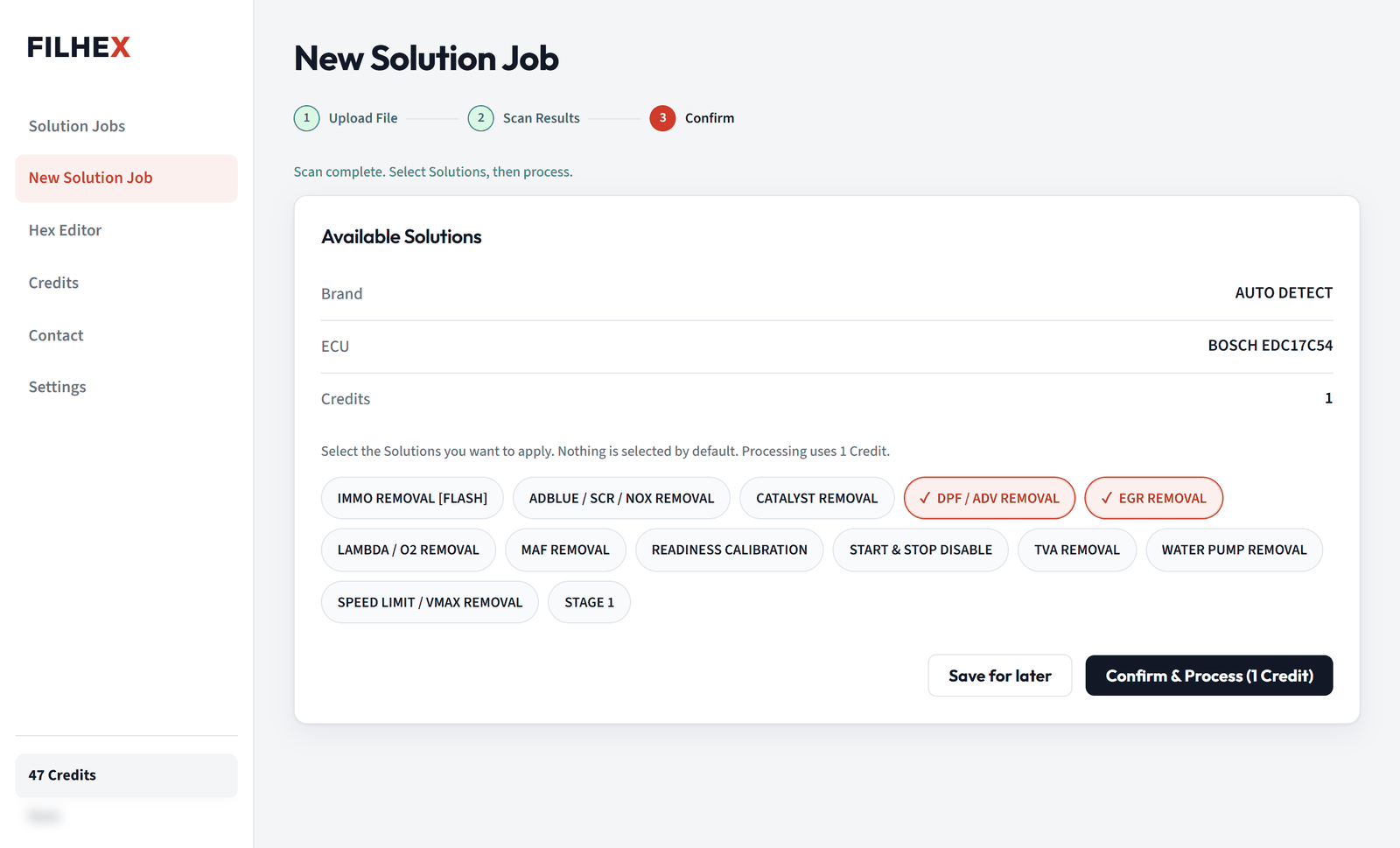
Upload the original File. Scan shows the Brand, ECU, and the Solutions that apply — no Credit spent.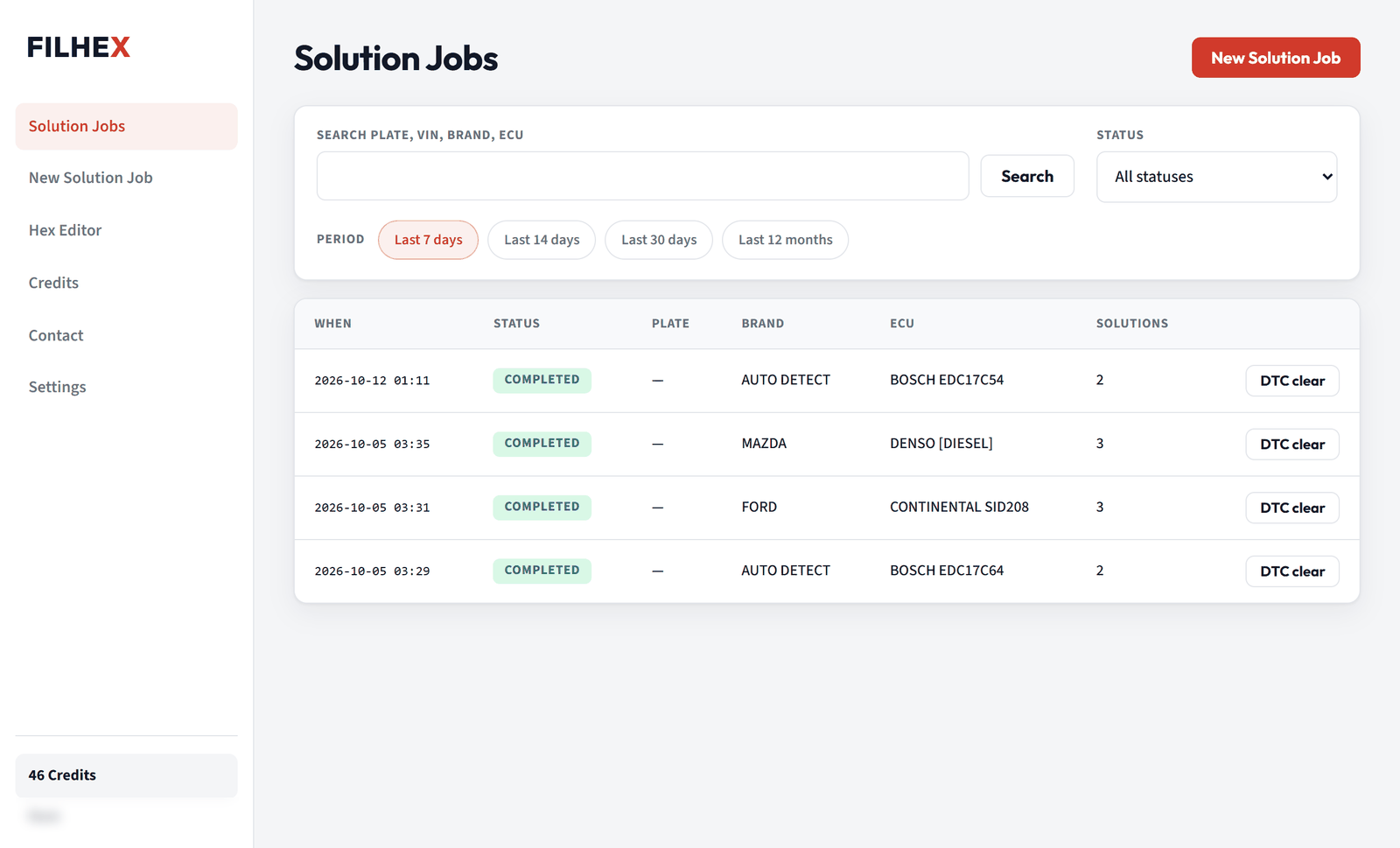 Select Solutions and process
Put every Solution you need on one Solution Job. Processing is automated and the app shows live status.
Select Solutions and process
Put every Solution you need on one Solution Job. Processing is automated and the app shows live status.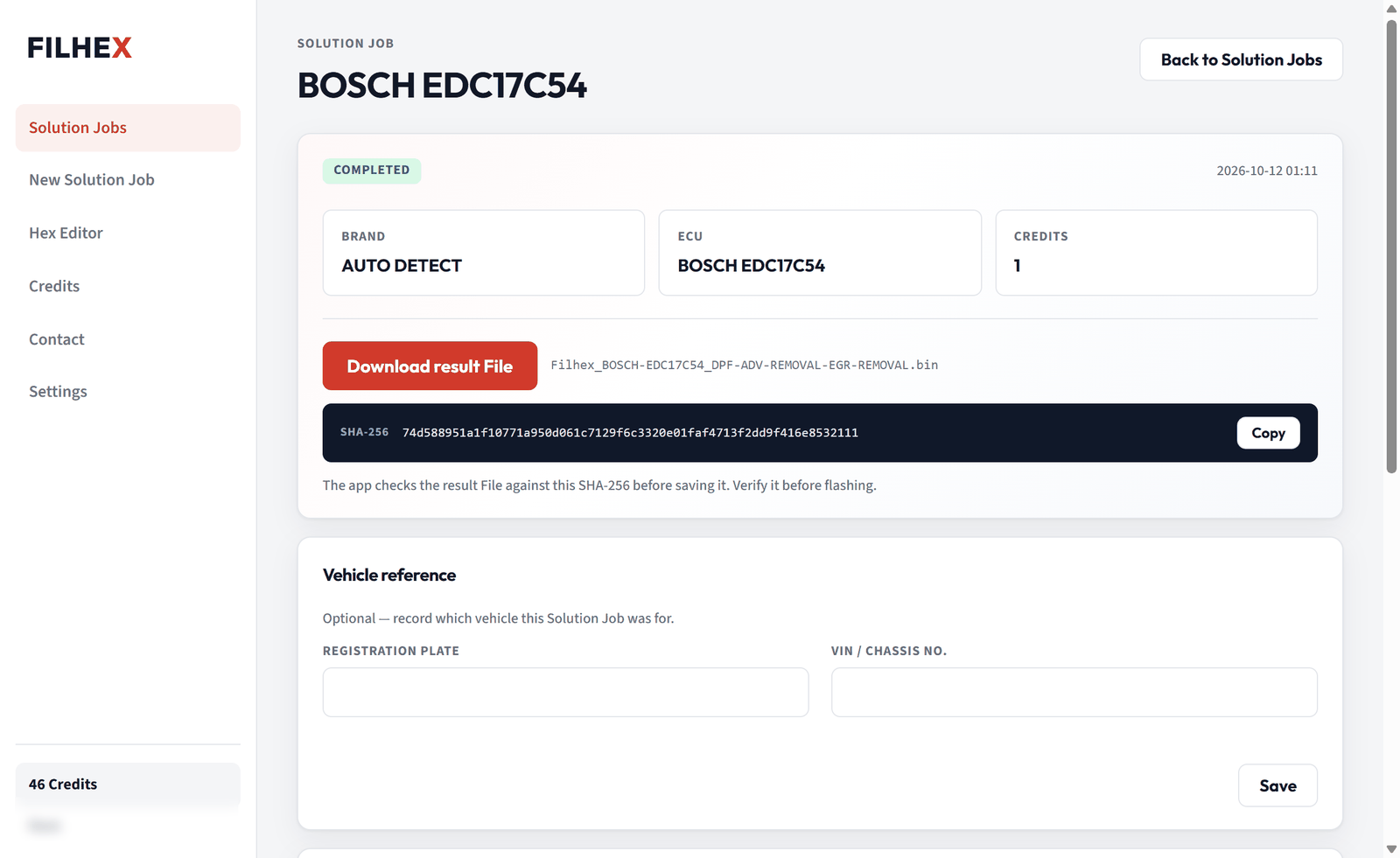 Download the result File
Flash it with your own tools. DTC clear runs on the same File if a code needs to go.
Download the result File
Flash it with your own tools. DTC clear runs on the same File if a code needs to go.The Solutions that come in every week — and what each one does to the File. Combine them on one job for one Credit.
Retires the soot model, regeneration logic, pressure monitoring and related codes for a filter that is no longer in play. Also searched as DPF off / DPF delete.
Sets the valve closed in the calibration, handles position and adaptation logic, retires the EGR fault codes. For sooted intakes and valves that keep failing.
Stops the dosing strategy, NOx-sensor feedback, countdown and no-start triggers. For NOx-sensor and dosing faults that cost more than the car.
Software-only performance calibration within stock hardware limits — boost, injection, timing and torque paths. What customers call a remap or chip tuning.
Selected fault codes switched off in the result File so they do not return — for hardware that is no longer fitted. Free on every completed job, up to 3 times.
GPF / OPF, swirl flaps, throttle valve, MAF, Hot Start Fix, Start & Stop Disable, speed and soft limiters, pop & bang, E85, TCU calibrations.
Emissions Solutions are not road-legal in most of Europe; the workshop stays responsible for legal use. What applies to a specific File is decided by scan, not by a list.
1 Credit = 1 processed File, with every Solution on that File included. One-time packs — no subscription, Credits never expire. Your first 5 Credits are free.
1 File Credit
€5
€5 per File
10 File Credits
€40
€4 per File
50 File Credits
€150
€3 per File
100 File Credits
€200
€2 per File
All Solutions on a File included — 1 Credit per File.
Pricing details · Prices in EUR. Buy packs in the app; secure card payment via Stripe in your browser.
Cars are already on the ramp with regeneration loops, EGR faults and AdBlue countdowns. The File step moves onto the same PC as the read/write tool, priced per job. FILHEX for workshops
DPF, EGR and SCR jobs every day, often on the same car. One Solution Job carries every Solution for one Credit, and DTC clear handles a sensor that was unplugged during the mechanical work.
A master tool, a laptop and a Workspace. Check coverage before quoting, pay per File, compare original and result in the Hex Editor before the write. New to it? How to start an ECU tuning business
You only pay when a Solution Job completes and the result File is ready.
FILHEX is operated by Filenk Tech. Support in English — same-day replies by email or on WhatsApp.
FILHEX is an ECU file service for tuners and workshops, not a map editor. You read the ECU and flash the result with your own tools; in the Windows app you upload the original File, scan it free, select Solutions such as DPF Removal, EGR Removal, AdBlue / SCR Removal or Stage 1, and download the result File FILHEX delivers. 1 Credit per processed File, with no seat licence and nothing to renew. FILHEX is operated by Filenk Tech.
Yes, twice. Before you install, search Brands, ECUs and Solutions on the FILHEX catalog page: passenger cars, with DPF Removal, EGR Removal, Stage 1 / Stage 2, AdBlue / SCR Removal, TCU Tuning, DTC clear and more. In the app, upload and scan are free: scan shows the Brand, ECU and the Solutions that apply to your File before you spend a Credit.
1 Credit = 1 processed File, and every Solution you select on that File is included. Packs are €5 for 1 Credit, €40 for 10 Credits, €150 for 50 Credits, €200 for 100 Credits. Credits never expire, there is no subscription, and DTC clear on a completed result File is free, up to 3 times.
Yes: 5 free Credits, enough for 5 processed Files. Install the Windows app, create a Workspace and verify its email, and FILHEX adds the Credits automatically. No card is needed to install, scan or use them; card checkout (Stripe, in your browser) only opens when the Workspace Owner buys a pack.
You are not charged. A Credit is captured only when a Solution Job completes and the result File is ready. If the job fails, the reserved Credit returns to your wallet automatically.
Every Solution in the FILHEX catalog is prepared and maintained by our engineering team. Your Solution Job then runs automatically, so there is no waiting for someone to come online; the app shows live status for every job. Support answers in English, by email the same day or on WhatsApp.
Yes. The Windows app includes a Hex Editor: open the original and the result side by side, step through every difference, read values as numbers or a graph, and search bytes or text — before you flash anything.
Your original and result Files are stored privately in your Workspace and used only to run your Solution Job. They are never published or sold.
Windows 10 (version 1809 or later) and Windows 11, 64-bit. Install from Microsoft Store; updates arrive through the Store.
Not in most European countries. FILHEX delivers the File; checking the rules in your country and documenting the customer's instruction is the workshop's responsibility. Stage 1 without touching emissions equipment is treated as legal in most places, but a power increase usually has to be declared to the insurer.
Guides: how to start an ECU tuning business, what is a tuning file service, what is an ECU File, DPF Removal, Credits vs subscription · all posts.
Install the Windows app and verify your email: the Credits are added automatically. Scan your first File before you buy. Questions first? Write to us on WhatsApp.
On your phone, or prefer to sign up first? Create your Workspace online